Google Ads for Tour Operators: A Beginner’s Guide for 2026
Updated October 2026
Google Ads can put your tours in front of travelers at the exact moment they search for something to book. It can also spend money quickly without producing a single reservation. The difference usually comes down to preparation: knowing your numbers, tracking real bookings, and starting with a focused campaign.
This guide is for tour, activity, and attraction operators who are new to Google Ads and want more profitable direct bookings. It walks through eight practical steps, from deciding whether ads fit your business to reviewing your first month of results. It also covers how Google's AI features are changing campaigns in 2026 and what to watch in 2027.
Google updates its platform often. Features, names, and availability can change, and some vary by country, so this guide links to Google's own documentation where the details matter.
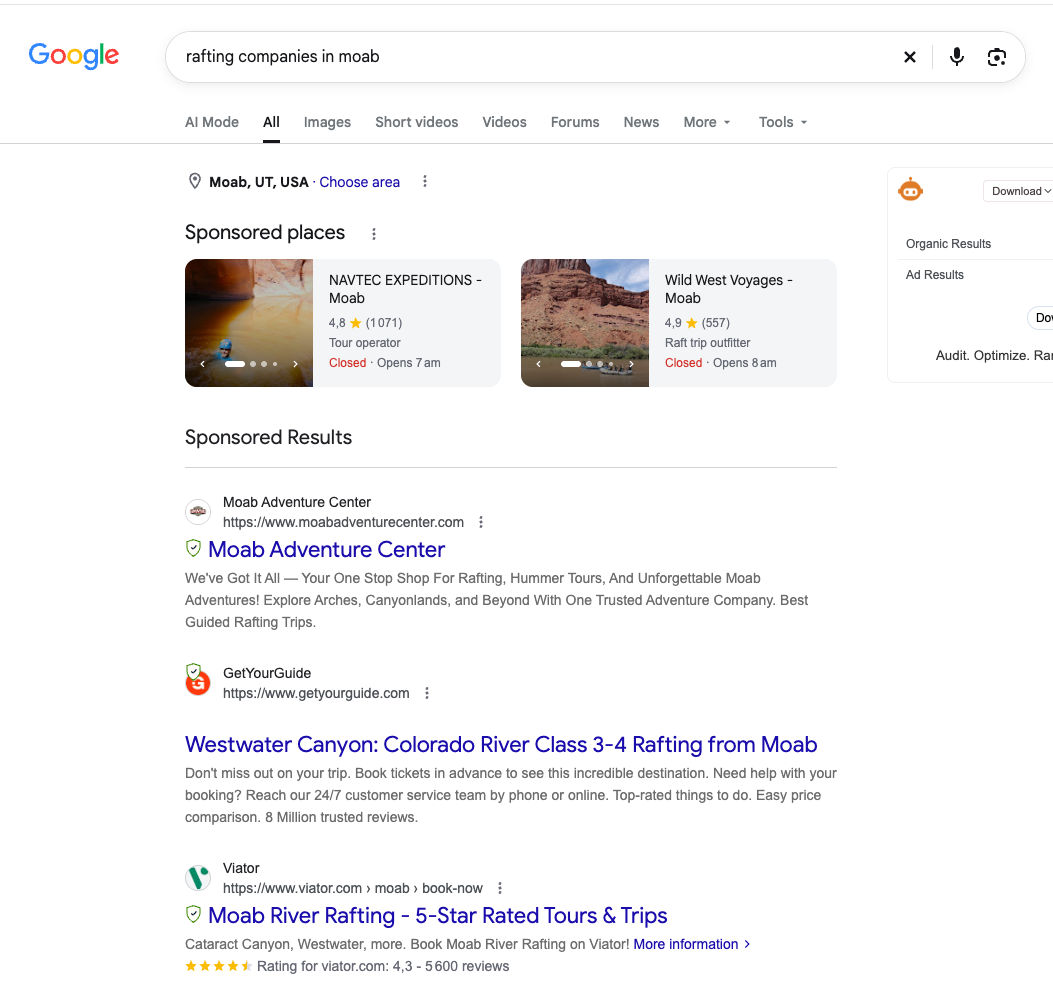
Google Ads Basics: Platform, Payment Model, and Campaign Types
Google Ads is Google's advertising platform. Pay-per-click (PPC) is a payment model: you pay when someone clicks your ad, not when it appears. Most Search ads are paid per click, but so are many other ad types on Google and on other platforms. PPC and Search ads are related, but they are not the same thing.
Inside Google Ads, you build campaigns. The campaign type decides where your ads can appear and how much control you have. The main types in 2026:
- Search: text ads on Google search results when someone searches for terms related to your keywords. Best for capturing people already looking for a tour like yours, and often the best place to start.
- Performance Max: one campaign across Search, YouTube, Display, Discover, Gmail, and Maps, largely managed by Google's AI. Best for operators with reliable booking tracking and enough budget for Google to learn across many channels.
- Demand Gen: visual ads on YouTube (including Shorts), Discover, Gmail, and the Google Display Network. Useful for building interest before people search, and for reaching past website visitors.
- Display: image ads on websites and apps in the Google Display Network. Google is moving Display into Demand Gen in phases, so new advertisers should look at Demand Gen first (Google Ads Help).
- Video: ads on YouTube and Google video partners. Good for awareness, especially for scenic, visual experiences.
Tour and activity operators may also qualify for Things to do listings and ads, which show tour details, prices, and booking options in travel results. These require your products to be connected through Google's Actions Center, usually via a Google-approved connectivity partner. Starting in Q3 2026, Google is migrating Travel campaigns for Things to do into Search campaigns for Travel (Google Ads Help). Ask your booking software provider whether it supports this connection.
One more point before you start: targeting guides who sees your ads. It does not guarantee qualified visitors or bookings. Keywords, locations, and audience settings tell Google where to look. Whether a click turns into a booking still depends on demand, price, availability, competition, and your booking experience.
Step 1: Decide Whether Google Ads Fits Your Business
Google Ads works best when people already search for what you sell, each booking leaves room to pay for advertising, and you have seats to fill. Before you spend anything, look at six factors.
- Search demand. Do travelers search for your activity in your destination? "Guided rafting trips Moab" has clear demand. A one-of-a-kind experience nobody knows to search for may need awareness first.
- Margins. Advertising comes out of what is left after guides, gear, fuel, permits, and booking fees. A tour with thin margins can generate bookings that lose money once ad costs are added.
- Seasonality. Demand and click costs rise and fall with the season. Plan budgets around when travelers search, which is often weeks or months before they arrive.
- Booking lead time and conversion delay. Booking lead time is the time between making a reservation and taking the tour. Conversion delay is the time between clicking your ad and making the reservation. Use booking lead time to plan seasonal advertising and capacity, and conversion delay to decide when you have enough data to evaluate campaign results.
- Available capacity. Ads cannot help a sold-out departure. Focus spending on dates and tours with open spots.
- Website and booking experience. Ads send people to your site. If the tour page is unclear or checkout is slow on a phone, the clicks you pay for will not turn into bookings.
If several of these factors are weak, fix them first. Paid traffic tends to magnify whatever is already true about your website and offer.
When campaigns underperform, poor management is only one possible cause. Low search demand, strong competitors, high prices, limited availability, or a difficult booking process can all hold results back, even in a well-run account.
Step 2: Choose a Meaningful Goal and an Affordable Booking Cost
Your goal should be completed bookings, or qualified inquiries if you sell through a sales conversation. Clicks and website visits are useful signals, but they do not pay for guides or gear.
Next, work out how much you can afford to spend to win one booking. Start with your own numbers.
Hypothetical example (not a benchmark):
- A booking produces $300 in revenue.
- After variable fulfillment costs (guide wages, equipment, permits, booking fees), $120 is left before advertising.
- Spending $60 in ads to acquire that booking leaves $60 before fixed overhead and other expenses.
- Revenue ROAS is 5:1 ($300 in revenue ÷ $60 in ad spend).
That 5:1 figure looks strong, but on its own it does not prove the booking was profitable. In this example, spending $120 to win the booking would still show a 2.5:1 ROAS, yet leave nothing to cover overhead.
Two terms are worth separating:
- ROAS (return on ad spend) compares the revenue Google Ads attributes to your ads with what you spent on them.
- ROI (return on investment) looks at profit after accounting for fulfillment costs, overhead, and the ad spend itself.
Google Ads reports ROAS. Profitability is something you calculate with your own cost data.
Booking, passenger, or inquiry?
Be clear about what you are counting when you calculate acquisition costs:
- A booking is one completed reservation. It may include several people.
- A passenger (or guest) is one person on that reservation. A $60 cost per booking for a party of four is $15 per passenger.
- An inquiry is a contact form, call, or quote request. It is not a sale yet. If one in four inquiries books, a $25 cost per inquiry means roughly $100 per booking.
Pick one unit, use it consistently, and compare it with the margin from that same unit.
Step 3: Set Up and Test Measurement Before You Spend
If Google cannot see your bookings, it cannot tell you which ads work, and its automated bidding cannot learn. Set up tracking first, then test it with a real booking before launching.
Track completed bookings and their actual value. Use your booking platform's supported integration or a properly configured purchase event to record successful reservations as a conversion action (an action Google Ads counts as a result). Depending on the system, this may use a confirmation page, a native integration, or a server-side connection. Pass the real booking total, not a fixed placeholder, and test the booking value, transaction ID, and attribution through the entire checkout.
Test checkout tracking, especially with third-party booking engines. Many operators take bookings through a booking system on a different domain. When a visitor moves from your site to the booking engine, tracking can break. Make a test booking and confirm it shows up in Google Ads with the correct value. Your booking software provider can confirm the right setup.
Use transaction IDs to avoid double counting. If a guest refreshes the confirmation page, the same booking can be counted twice. Sending a unique transaction ID (such as the booking number) with each conversion lets Google Ads ignore duplicates for that conversion action. Transaction IDs do not prevent the same booking from being counted through two different conversion actions, though. Do not make both a native Google Ads purchase conversion and an imported GA4 purchase primary for the same booking. Choose one as primary and set the other to secondary.
Separate primary outcomes from softer actions. Google Ads lets you mark conversion actions as:
- Primary: counted in the Conversions column and used for automated bidding. Use this for completed bookings or qualified inquiries.
- Secondary: recorded for observation only. Use this for email signups, "Book Now" button clicks, or brochure downloads.
If a button click is set as primary, Google may optimize toward people who click and never book.
Track qualified inquiries for tours sold through a conversation. Private charters, multi-day expeditions, and group trips often start with an inquiry. Track form submissions and calls, then use enhanced conversions for leads to tell Google which inquiries became real bookings. This feature matches hashed lead details from your form with sales you upload later, so bidding can learn from sales instead of raw form fills.
Reconcile ad reports with your booking system. Every week or two, compare Google Ads' attributed bookings with relevant records in your booking system, rather than expecting it to match your total reservations. Organic search, referrals, email, and other channels also generate sales, so a large difference alone does not prove tracking is broken. Align the conversion action, date basis, time zone, and revenue definition before investigating differences. Google Ads' "Conversions (by conv. time)" columns can help when comparing against reservation dates (Google Ads Help).
Account for cancellations and refunds. Gross booking revenue can overstate results when reservations are canceled or refunded. Reconcile against net results in your booking system, and consider conversion adjustments to retract or restate the value of canceled bookings in Google Ads.
Optional troubleshooting note: if test bookings made through a booking engine on a different domain do not appear in Google Ads, check cross-domain measurement. List every domain involved in your Google tag settings, then confirm a "_gl" parameter appears in the URL when you click from your site into checkout.
Enhanced conversions and consent
Enhanced conversions improve measurement accuracy by sending hashed first-party data, such as the email address a guest enters at checkout, to Google. Hashing turns the data into a coded string, so the raw details are not shared. To use it, you must accept Google's customer data terms and follow its policies, and your privacy policy should disclose it. Starting June 2026, Google combined enhanced conversions for web and leads into a single setting (Google Ads Help).
Consent matters if you advertise to travelers in the European Economic Area (EEA), the UK, or Switzerland. Google's EU user consent policy requires advertisers to get consent from users in these regions, and to pass consent signals to Google, typically through a consent banner and Consent Mode. Without those signals, ad personalization and some measurement features are limited. Other regions, including some US states, have their own privacy rules, so confirm what applies to the places you target with your legal or privacy advisor.
Neither tool bypasses consent. When people decline tracking, Consent Mode can use modeling to estimate some missing conversions once there is enough data, but it does not recover all of them. Expect some gap between Google Ads and your booking system.
Step 4: Choose a Focused First Campaign
For many operators with limited budgets and existing search demand, a focused Search campaign is a reasonable place to start. It is our recommendation, not a universal rule. Search reaches people who are actively looking for an activity, gives you visible keyword and search-term data, and is easier to troubleshoot than campaigns that run across many channels at once.
Keep the first campaign small:
- One priority tour, or a closely related group of tours. For example, your half-day and full-day rafting trips, not every product you sell.
- One relevant landing page that matches what the ads promise.
- A budget you can sustain long enough to learn from (see Step 7).
When you create a new account, Google may steer you toward a simplified setup. If you want full control over keywords, bidding, and settings, look for the option to switch to Expert Mode during setup.
Other campaign types can become useful later:
- Performance Max may make sense once booking tracking is reliable and you have steady conversion data, since it relies heavily on that data to decide where to show ads.
- Demand Gen or Video can help when people do not yet know to search for your experience, or to re-engage past website visitors.
- Things to do / Search campaigns for Travel may be worth exploring if your booking software connects to Google's Actions Center.
There is no need to run Search and Display together from day one. Add channels one at a time, so you can tell what each one contributes.
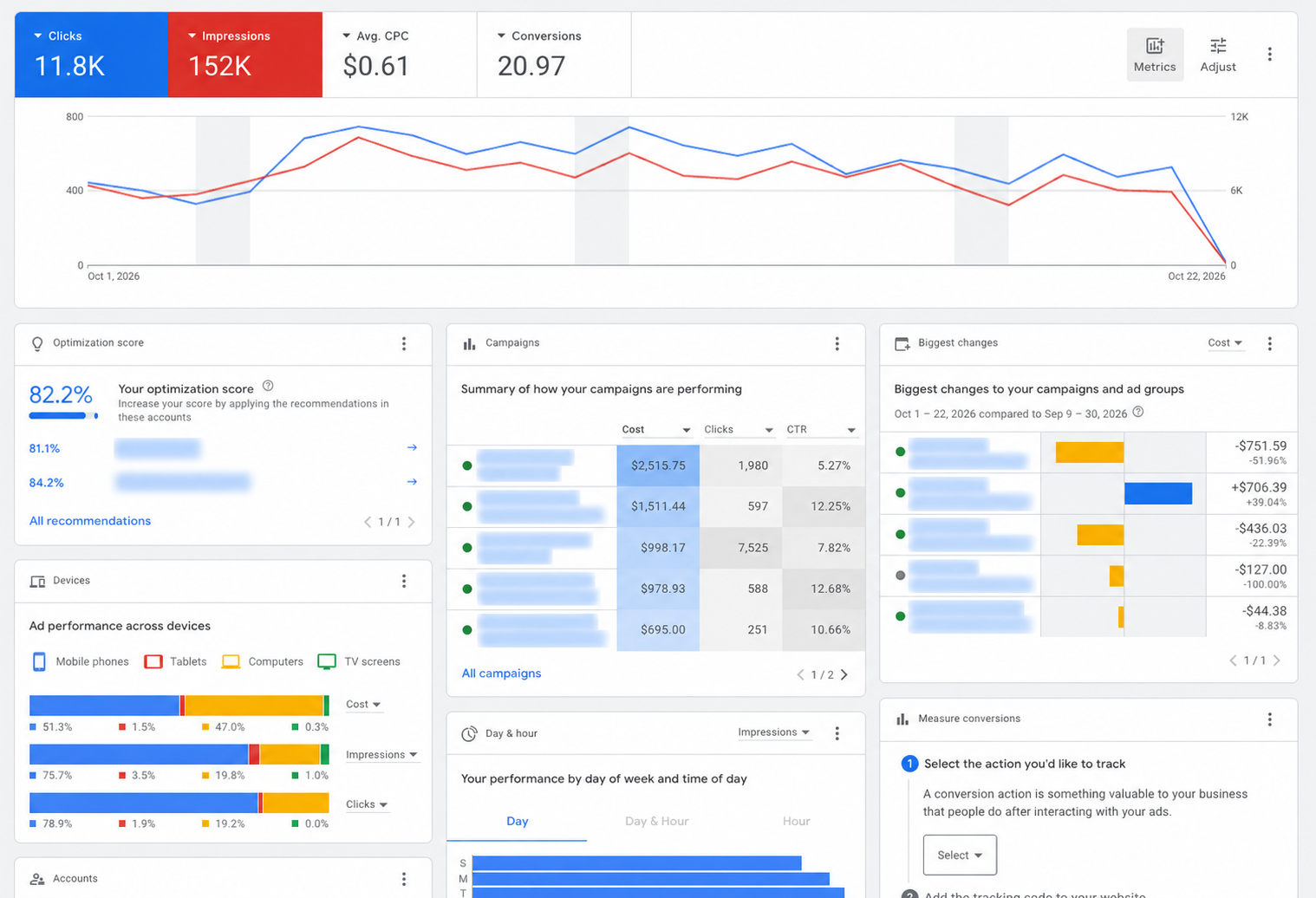
Step 5: Choose Keywords and Location Settings
Keywords are the words and phrases you tell Google are relevant to your tours. Google uses them to decide which searches your ads can appear on.
Start with searches that show booking intent:
- Strong booking intent: "guided rafting trips Moab." The searcher knows the activity, the place, and wants a guide. This is where a first campaign should focus.
- Broader research intent: "things to do in Utah." The searcher is still planning. Click costs and conversion rates vary; test broader searches separately.
- Potential negative keyword: "jobs." Someone searching "rafting guide jobs Moab" wants employment, not a trip.
Match types in plain English
A match type tells Google how closely a search must relate to your keyword:
- Broad match (no symbols): ads may show on searches related to your keyword. This reaches the most searches and relies most on Google's interpretation.
- Phrase match ("in quotes"): ads may show on searches that include the meaning of your keyword, including more specific versions.
- Exact match ([in brackets]): ads may show on searches with the same meaning or intent as your keyword. Exact match is not literal word-for-word matching. [guided rafting Moab] can match "Moab guided rafting" or close variations.
With broad match, review your search terms report often, especially in the first weeks.
Negative keywords depend on context
Negative keywords stop your ads from showing on searches you do not want. There is no universal list. "Free" may be a good negative for a paid tour, but a bad one if you run free walking tours. "Cheap" may save money for a luxury operator and lose bookings for a budget one. "Jobs" is a common negative, unless you also use ads to recruit guides.
Negative keywords do not automatically block synonyms or close variants, so add the variations you want to exclude yourself.
Location settings: planners vs. visitors already there
Tour operators usually have two audiences:
- Travelers planning from home. Someone in Denver searching for Moab rafting trips in March. They may book weeks ahead.
- Visitors already at the destination. Someone in Moab searching "rafting today" on their phone. They often book same day or next day.
Google's location settings handle these differently. Your target locations set the places. The location options decide how strictly they apply:
- Presence or interest (Google's default): people in, regularly in, or showing interest in your target locations. Targeting "Moab" with this setting can reach someone in Denver researching Moab.
- Presence: only people in or regularly in your target locations. Useful for a campaign aimed at visitors already in the area.
Many operators run separate campaigns, or at least review location reports separately, for planners and for in-destination visitors, since their timing, messages, and budgets differ. Use exclusions for places where you cannot serve guests or do not want to spend.
Step 6: Write Useful Ads and Prepare the Tour Page
Search campaigns use responsive search ads. You provide up to 15 headlines (30 characters each) and up to 4 descriptions (90 characters each), and Google tests combinations to show the most relevant version for each search. You can also add two display path fields (15 characters each) that appear in the ad's web address.
Write each headline so it makes sense on its own, since any combination may appear. Use real details travelers care about: the activity, the place, duration, price, age limits, and what is included.
Example responsive search ad
Example only. The business, prices, and policies below are invented for illustration.
Headlines (30 characters max)
- Guided Rafting Trips in Moab
- Half-Day & Full-Day Trips
- Small Groups, Expert Guides
- Family Friendly, Ages 6+
- All Rafting Gear Included
- Book Online in Minutes
- Free Cancellation 48 Hrs Out
- Colorado River Whitewater
Descriptions (90 characters max)
- Raft the Colorado River with licensed local guides. Half-day trips from $89 per person.
- Small groups and all gear included. Check live availability and book your date online.
- Ages 6 and up. Free cancellation up to 48 hours before your trip. Reserve your spot.
Display path: example.com/rafting/half-day
Only use claims you can back up. If the price, age limit, or cancellation policy changes, update the ad the same day.
Ad assets
Assets (formerly called extensions) add extra information to your ads and can make them larger and more useful. Helpful ones for tour operators:
- Sitelinks: links to specific pages, such as other tours, group bookings, or FAQs.
- Callouts: short phrases like "Gear Included" or "Small Groups" (25 characters each).
- Structured snippets: lists under a header, such as Types: Half-Day, Full-Day, Overnight.
- Price assets: a row of tours with prices, each linking to its own page.
- Image assets: photos of the actual experience.
- Call assets: a phone number, useful for visitors already in the area or for complex trips.
- Location assets: your address and map, pulled from a linked Google Business Profile.
- Promotion assets: a seasonal offer, when you have one.
Google decides which assets to show for each search, so not every asset appears every time.
Prepare the Tour Page: Landing Page Checklist
The page your ad links to does much of the selling. Before launch, make sure it covers:
- Tour details, duration, and location, including where to meet
- Clear pricing, with any taxes, fees, or per-person vs. per-group terms explained
- Availability and the booking process, ideally with live dates and as few steps as possible
- Age, fitness, or participation restrictions
- Cancellation and weather policy
- Trust signals and reviews, such as recent guest reviews, permits, safety credentials, and years in operation
- Mobile usability, since many travelers search and book on their phones
- A clear booking call to action, visible without hunting for it
For more on building tour pages that convert, browse our other tour operator marketing guides.
Step 7: Set a Budget and Choose a Bidding Approach
Build your budget from your own economics, not a generic number. You need three inputs: the most you can pay per booking (Step 2), what clicks are likely to cost for your keywords, and how often clicks turn into bookings.
Illustrative math (assumptions, not benchmarks):
- Affordable cost per booking: $60 (from the Step 2 example)
- Assumed average cost per click: $2.00
- Assumed conversion rate from click to booking: 4%
- Estimated cost per booking: $2.00 ÷ 0.04 = $50
- To test for roughly 20 bookings: 20 × $50 = $1,000
Your real click costs come from Google's Keyword Planner and, more reliably, from your first weeks of data. Your conversion rate comes from your own website. If actual costs land well above your affordable cost per booking, the fix may be better keywords, a stronger tour page, a different offer, or deciding Google Ads is not a fit for that tour right now.
How Google's daily budget works
The budget you enter is an average daily budget, not a strict daily cap:
- On any single day, a campaign can spend up to 2 times its average daily budget, so it can take advantage of busier days.
- Over a calendar month, Google will not charge you more than 30.4 times your average daily budget (30.4 is the average number of days in a month). If ads deliver more than that, Google credits the overdelivery.
- Exceptions: if you change the budget mid-month, the rest of the month is paced to the new budget. A campaign that starts mid-month only counts the days it runs. Ad scheduling does not lower the monthly limit.
Example: a $30 average daily budget can spend up to $60 on one day, with a monthly charging limit of $912.
In 2026, Google also introduced campaign total budgets for Search, Performance Max, and Shopping. You set one budget for a fixed period (3 to 90 days for Search), such as a holiday promotion, instead of a daily amount. Spend can vary day to day, but you will not be billed above the total.
Choosing a bidding approach
Your bid strategy tells Google what to aim for in each auction. The main options for Search campaigns:
- Manual CPC: you set maximum cost-per-click bids yourself. Some advertisers use it for tight control while learning, but a small budget alone does not determine which bidding strategy is best. (Enhanced CPC was retired in 2025.)
- Maximize clicks: aims to generate as many clicks as possible within your budget. It can support a deliberate traffic test, but it does not optimize for bookings. Confirm conversion tracking works before launching, regardless of the bidding strategy.
- Maximize conversions (optional target CPA): aims for the most conversions within budget, optionally at a target cost per conversion. Fits once booking or qualified inquiry tracking works and conversions are recorded consistently.
- Maximize conversion value (optional target ROAS): aims for the most booking value within budget, optionally at a target return on ad spend. Fits when you track real booking values and those values differ meaningfully across tours.
- Target impression share: aims to show your ad at the top of results a set percentage of the time. Useful for protecting visibility on your brand name, but not focused on bookings.
The automated options (Maximize conversions and Maximize conversion value) are called Smart Bidding. They work only as well as the data you feed them. A few things affect the choice:
- Conversion quality. If your primary conversion is a button click instead of a booking, Smart Bidding will chase button clicks.
- Account history. A brand-new account has little data. Google may need time to learn, and early results can be uneven.
- Goals. Use value-based bidding when revenue per booking varies, such as a $79 kayak tour alongside a $1,400 multi-day trip.
- Budget. A budget that limits the campaign heavily can restrict how well automated bidding performs.
Google does not publish a single minimum number of conversions for Search Smart Bidding, so be wary of anyone quoting one as a rule. Google does suggest waiting about four weeks, or three conversion cycles, after you start recording or change conversion values before switching to Maximize conversion value.
Step 8: Review Performance and Improve
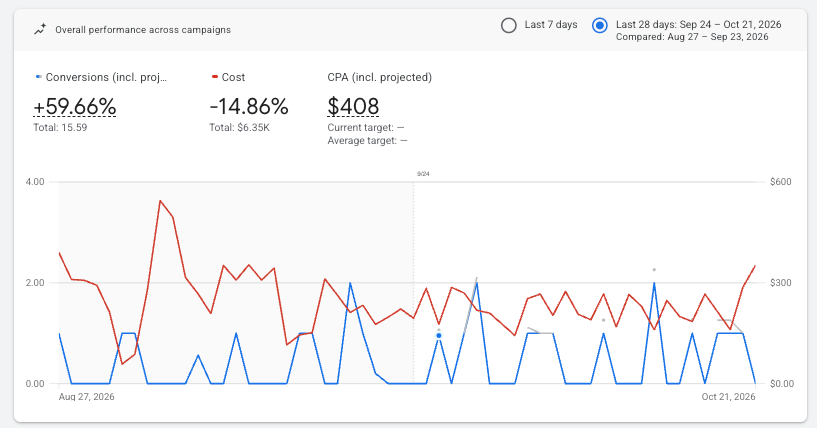
The first month is about learning what works, not judging the whole channel. Review weekly, change a few things at a time, and keep notes on what you changed and when.
First-month review checklist
- Tracking accuracy: do the bookings and revenue Google Ads attributes line up with the matching records in your booking system, once conversion action, date basis, time zone, and revenue definition are aligned?
- Search-term relevance: read the search terms report (the actual searches that triggered your ads) and add negative keywords for irrelevant ones.
- Geographic performance: which locations produce bookings, and are planners or in-destination visitors converting better?
- Spending and booking costs: is cost per booking (or per qualified inquiry) within what you can afford?
- Booking value and ROAS: are the bookings coming from your higher-value tours or mostly from your cheapest?
- Inquiry quality: if you track inquiries, how many turn into real bookings?
- Landing-page performance: are people reaching checkout and abandoning it, or leaving the tour page quickly?
- Conversion delay: use the "days to conversion" view to see how long people take to book after clicking. Keep this separate from booking lead time, which is how far ahead of the tour date guests reserve.
- Capacity and seasonal changes: pause or reduce spend on sold-out dates, and shift budget toward departures with open spots.
Useful reporting metrics
Google retired the old "average position" metric in 2019. These are more useful today:
- Search impression share: the share of eligible impressions your ads actually received.
- Search lost impression share (budget): how often your ads did not show because the budget ran out.
- Search lost impression share (rank): how often they did not show because of low Ad Rank (your bid combined with ad quality and other factors).
- Top and absolute top impression rates: how often your ads appeared above the organic results, or as the very first ad.
What Quality Score does and does not tell you
Quality Score is a 1 to 10 rating shown for each keyword, based on expected click-through rate, ad relevance, and landing page experience. Google describes it as a diagnostic tool, and it is not an input in the ad auction. In each auction, Google makes its own real-time assessment of ad and landing page quality as part of Ad Rank. Use Quality Score to spot weak ads or pages, not as a goal on its own.
Be patient with the data
A few clicks prove very little. Conversion delay, the time between an ad click and a reservation, means some recent clicks have not turned into bookings yet, so the last several days will usually look worse than they really are. Booking lead time, the time between a reservation and the tour, does not delay the conversion itself, but it shapes when demand appears during the season.
For Smart Bidding, Google recommends evaluating results over at least two conversion cycles or two weeks, whichever is longer, and avoiding multiple target changes within one cycle. Changing bids, budgets, and keywords every few days resets your read on what is working and can keep automated bidding from settling. Make one meaningful change, give it time, and then review.
How AI Is Changing Google Ads for Tour Operators
Google's AI now shapes which searches your ads match, what your ads say, and which page people land on. These tools can find bookings you would miss on your own, but they need clear inputs and regular human review.
AI Max for Search campaigns
AI Max is a set of optional features you turn on inside an existing Search campaign. It is not a separate campaign type. It has three parts:
- Search term matching: expands your reach to relevant searches beyond your keywords, using broad match and keywordless matching based on your site and ads.
- Text customization: generates headlines and descriptions based on your landing pages, ads, and keywords.
- Final URL expansion: lets Google send people to the page on your site it judges most relevant to the search, instead of always using the page you chose.
Each part can be switched off separately. Controls such as URL exclusions and text guidelines let you limit where traffic goes and what generated text can say.
Google is also moving older features into AI Max, including automatically created assets, the campaign-level broad match setting, and Dynamic Search Ads (Google's announcement).
What this means for tour operators
- Expanded matching can surface searches you did not think of, such as a nearby town or a different name for your activity. It can also surface searches that do not fit, so check the search terms report more often when it is on.
- Generated text may pull details from any page on your site. If an old blog post mentions a discontinued tour or last year's price, that detail could appear in an ad.
- Landing-page selection may send people to a page you did not intend, such as a general blog article instead of the bookable tour page. Use URL exclusions for pages that should never receive ad traffic.
Review automated content against reality. Check generated headlines, descriptions, and landing pages against your current pricing, availability, restrictions, policies, and tour lineup. You remain responsible for everything your ads say, including AI-written text.
AI-powered Search experiences
Ads can now appear in and around AI-generated answers in Google Search, and Google is still testing new placements, including in AI Mode. Availability varies by country, language, and account, and there is no tour-specific setting to manage. Accurate tour pages and reliable booking data are the best preparation.
What Tour Operators Should Watch in 2027
Some changes are already scheduled. Others are trends worth watching, but nobody outside Google knows exactly how they will play out.
Confirmed by Google
- Dynamic Search Ads move to AI Max. Google says automatic upgrades begin in February 2027 (Google Ads Help).
- Call-only ads stop serving. Google says existing call-only ads stop serving in February 2027. Responsive search ads with call assets are the replacement (Google Ads Developer Blog).
- Display continues moving into Demand Gen. Later steps do not have firm dates yet (Google Ads Help).
- Things to do campaigns move to Search campaigns for Travel. Watch your account notifications for your migration date (Google Ads Help).
Reasonable expectations, not announcements
Expect AI features and AI-powered Search placements to keep expanding, and measurement to rely more on first-party data and consent. Timing by country and language is unknown, and no feature can promise results.
How to prepare
- Reliable booking data: accurate conversion tracking with real booking values and transaction IDs.
- Clear tour pages: current prices, availability, restrictions, and policies on every bookable page, since AI tools read your site.
- Accurate creative: ads, images, and assets that reflect what guests will actually experience.
- Thoughtful human oversight: regular review of search terms, generated text, landing pages, and spending, by someone who knows your business.
Frequently Asked Questions
How much should a tour operator spend on Google Ads?
There is no standard amount. Start from what you can afford per booking, estimate click costs and conversion rates for your keywords, and set a test budget large enough to produce meaningful booking data over several weeks.
How long until Google Ads produces bookings?
Ads can appear within a day of approval, but judging performance takes longer. Conversion delays and learning periods for automated bidding mean a few weeks of data is usually the minimum for a fair read.
Can Google Ads compete with OTAs and large tour marketplaces?
Yes, on specific searches. Large booking sites often bid broadly, while a local operator can focus tightly on its own tours, destination, and brand name, with a direct booking page that answers travelers' questions.
Should I bid on my own business name?
It depends on competition and whether the ads generate additional bookings. Competitors and resellers may bid on your name, and brand searches are usually inexpensive. Check whether brand campaigns are bringing in new bookings or mostly capturing people who would have found you anyway.
Should I turn on AI Max?
It depends on your tracking, budget, and website. AI Max works best with reliable booking data and an accurate, up-to-date site. If you turn it on, review search terms, generated text, and landing pages closely.
Get Help With Your Google Ads
Google Ads can be a reliable source of direct bookings when it is built on accurate tracking, clear tour pages, and steady oversight. If you would like a second set of eyes on your setup, or help running campaigns for your tours, the ResmarkWeb team works with tour and activity operators every day. Schedule your free discovery call to talk it through.
Travel & Tourism Marketing Blog